WoW logs are the combat records that players upload to Warcraft Logs, a third-party analysis site that turns raw game data into charts, rankings and replays. If you are searching for them, you probably want to know what a “parse” actually measures, why your damage meter and your log show different numbers, or how to find the mistake that cost you a boss kill. This guide explains what WoW logs track, how the colour-coded parse system works, the two numbers people constantly confuse, and the four tabs that fix most performance problems.
What WoW Logs Actually Are
World of Warcraft writes a combat log file to your computer when you enable Advanced Combat Logging in the Network settings and type /combatlog in-game . That file records every event: every cast, every hit, every buff, every death. On its own, it is an unreadable wall of text.
Warcraft Logs takes that file and parses it into a public report. You upload it through the Warcraft Logs Uploader or the Overwolf Companion app, and the site organises the data into tables, timelines and replay views . Anyone with the report link can see it, unless you set it to private.
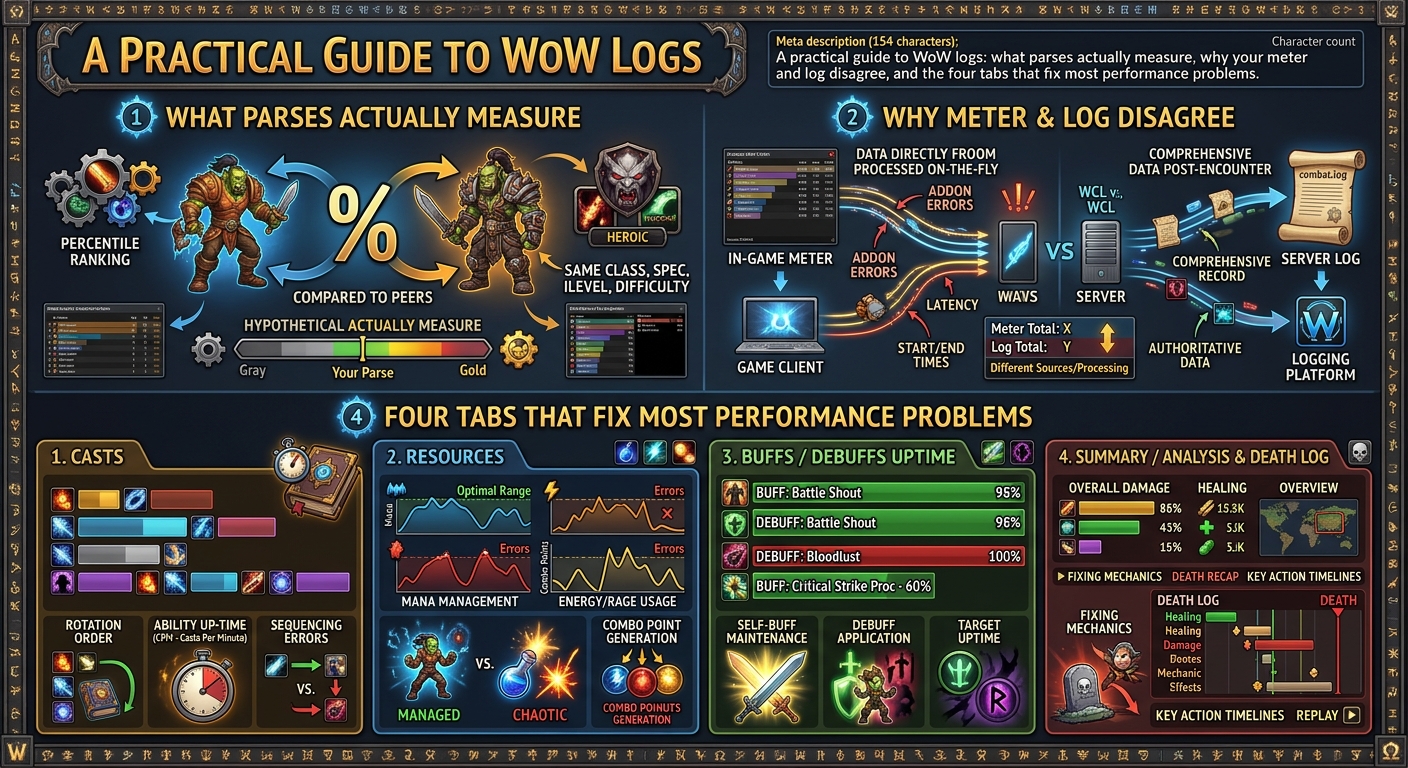
The important distinction is that a log is not a measure of effort. It is a record of what happened, and the parse is a ranking of one specific number against other players of your spec who killed the same boss on the same difficulty during the current ranking window .
The Parse Colours in Plain English
Every parse is a percentile from 1 to 100. The colours are just thresholds, and they are widely misunderstood as a verdict on your ability. They are not.
| Colour | Percentile | What it generally means |
| Grey | 1 to 24 | Bottom quarter. Something is off, usually rotation or uptime |
| Green | 25 to 49 | Below average. Often gear, talents, or too much time in avoidable damage |
| Blue | 50 to 74 | Average to above average. The big middle bucket |
| Purple | 75 to 94 | High. You know your spec |
| Orange | 95 to 98 | Top of your spec for this kill window |
| Pink | 99 | The best players of your spec |
| Gold | 100 | Server first or raw all-stars parse, very rare in pugs |
One parse is not a verdict. A single kill can swing two colours purely on RNG. Look at five to ten parses across different fights before making a judgement about a player .
The Two Numbers People Confuse
Warcraft Logs shows two parse numbers side by side, and guilds argue about them constantly. They measure different things.
Parse (also called rDPS or Historical) ranks your damage including external buffs your group gave you. If a warrior used Skull Banner on you, the boost shows up here. It rewards being in a stacked group .
Ranking by aDPS (Adjusted) strips out the value of external buffs. This is the number class theorycrafters look at, because it measures what your own keys did .
If your raid leader is grading your contribution to the kill, parse is the right number. If you are trying to find your own mistakes, switch to aDPS .
Why Your Damage Meter and Your Log Disagree
A common complaint is that the in-game damage meter shows 120K DPS but the log shows 90K. This is not a bug. It is a difference in what is being measured.
Details and the default Blizzard meter do not track out-of-combat time. Warcraft Logs treats the whole dungeon as one long fight, downtime included. If you die and run back, or wait for someone else to run back, that time counts as combat with you doing zero DPS. Your DPS is damage divided by key duration, and all that downtime drags the number down .
The closer your group is to zero downtime, the closer the meter and the log will be. If you want a log number that reflects your actual performance in combat, look at a fight where you did not die and the group did not wipe .
The Four Tabs That Fix Most Problems
A single boss report has more tabs and filters than most players need. These four cover almost everything that drops a parse .
Damage Done
Open Damage Done, click your name, and look at the ability breakdown. Are your highest-damage abilities in the right order? If a filler is dealing more than your main spender, something is wrong with your rotation .
Casts
The Casts tab exposes lazy play. You can see exactly how many times each cooldown went out, how many global cooldowns you wasted standing still, and whether you used your trinket on cooldown. A quick test: take the fight length in seconds, divide by your major cooldown’s cooldown length, and that is roughly how many casts you should see. If a two-minute cooldown shows up twice in a five-minute fight, you left one unused .
Buffs
The Buffs tab shows uptime on every dot, debuff and self-buff you maintained. A restoration druid with 65% Lifebloom uptime has a clear problem, because that should be close to 100% .
Replay
The replay feature lets you watch the fight from a bird’s-eye view, with player movement, spells and buffs visible in real time. It is useful for seeing where you stood, when you moved, and what you could have done differently .
Reading Logs for Healing, Not Just Damage
Healers often get told to look at their parse, but the parse is the least useful number for a healer in a raid group that is overhealing.
A forum discussion on MMO-Champion makes the practical point. If you are three-healing a twelve-man group, there is not enough damage going out for any healer to rank highly. Looking at percentile numbers will just tell you that you had little to heal. The useful data is in the Casts tab and the Buffs tab: your Lifebloom uptime, your cooldown usage, whether your Tranquility was timed well or overlapped with another healer’s cooldowns .
The same principle applies to tanks. A tank’s parse is not a measure of survivability. Look at damage taken, active mitigation uptime and cooldown usage instead.
Frequently Asked Questions
What are WoW logs?
WoW logs are combat records uploaded to Warcraft Logs, a site that turns raw game data into reports showing damage, healing, buffs, deaths and player movement. They are used to analyse performance in raids and Mythic+ dungeons .
What does a parse mean in WoW?
A parse is a percentile ranking of your damage or healing on a specific boss fight, compared against other players of your spec who killed the same boss on the same difficulty during the current ranking window. It is not a measure of effort or skill in isolation .
Why is my WoW log DPS lower than my damage meter?
Warcraft Logs counts the entire dungeon as one fight, including downtime from deaths, running back and waiting. Your in-game meter does not track out-of-combat time. The more downtime your group has, the bigger the gap between the two numbers .
How do I upload WoW logs?
Enable Advanced Combat Logging in the game’s Network settings, type /combatlog to start recording, then upload the file using the Warcraft Logs Uploader or the Overwolf Companion app. You can upload after the session or live-log in real time .