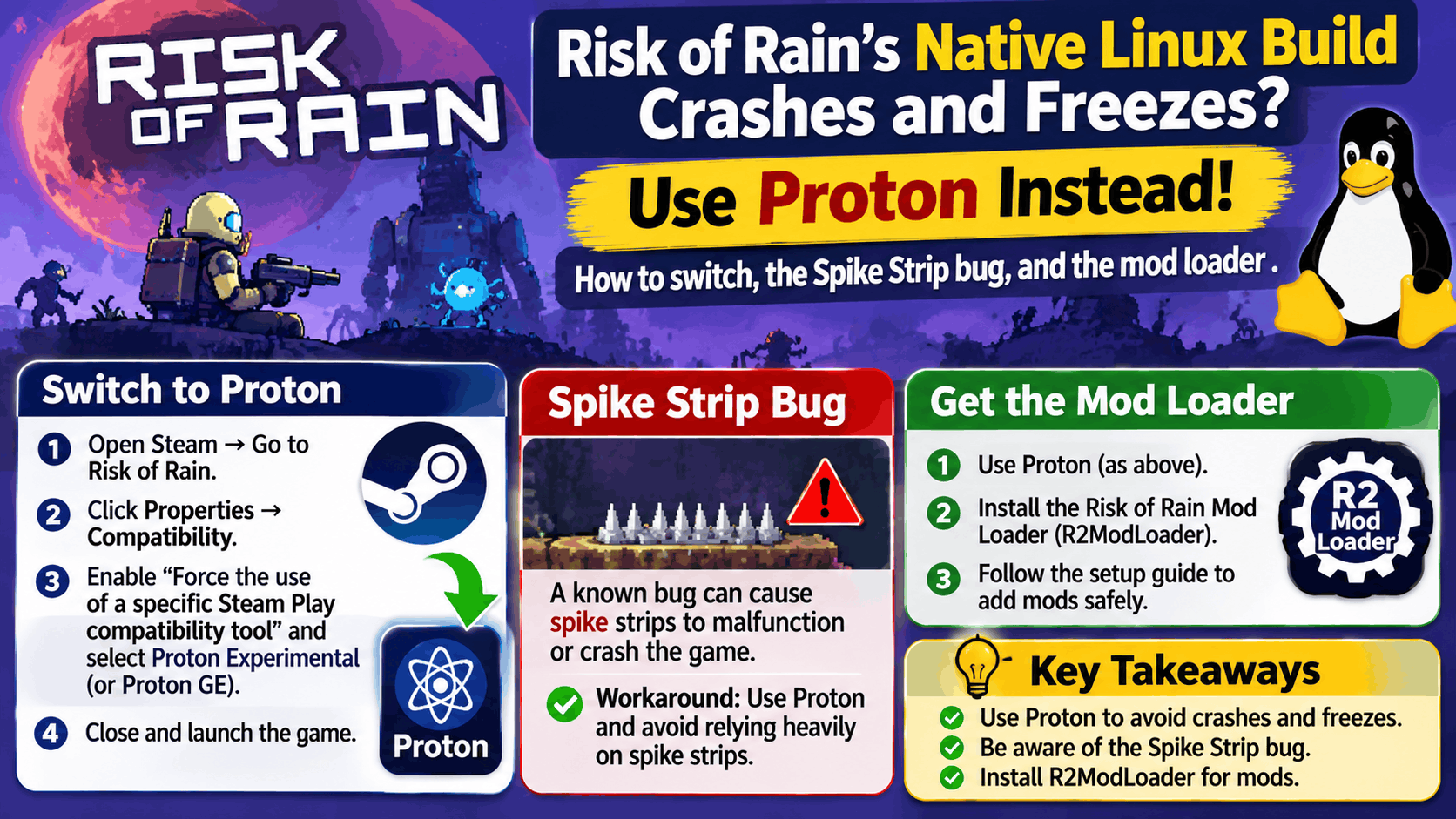
The short answer is this: Risk of Rain (2013) does have a native Linux build, but it is broken. The native version crashes frequently, freezes when you pick up a Spike Strip, and has been effectively abandoned. The reliable way to play Risk of Rain on Linux is to force Steam to use Proton, Valve’s compatibility layer, which runs the Windows version and avoids the native build’s game-breaking bugs entirely . If you have tried the native version and given up after a crash, you are not alone. This guide explains the specific faults, how to switch to Proton, and the one cosmetic issue you will notice afterwards.
Table of Contents
ToggleThe Native Linux Build Is Effectively Broken
Risk of Rain shipped with an official Linux build, and on paper that should be the best way to play. In practice, community reports on ProtonDB and GOG forums describe a build that is unstable to the point of being unusable for serious runs.
The most specific and damaging bug is the Spike Strip freeze. When an enemy activates a Spike Strip, the game locks up. This is not a rare edge case; it is a common item interaction that will end your run . Other reported crashes include the game freezing when attacking the elite Elder Lemurian guarding the Miner, and crashing when certain elite mobs spawn after a long session . One ProtonDB reporter put it bluntly: “The native version is effectively broken since it has parts where the game consistently crashes and is in general really unstable. Playing with Proton is required, assume there’s no native version” .
A GOG forum user on Ubuntu 24.04 found that the native version would not even launch, with the startup script failing to find the game binary. Their workaround was to run the Windows installer through Lutris and Wine . That is the same conclusion the ProtonDB community reached independently: use the Windows build.
How to Force Risk of Rain to Use Proton on Steam
If you own the game on Steam, switching to Proton takes a few minutes. The game will download the Windows depot and run it through the compatibility layer.
-
Open Steam and go to Settings. Click the Steam menu in the top left and select Settings.
-
Find Steam Play. In the Settings sidebar, click Steam Play.
-
Enable Steam Play for all titles. Tick the box labelled “Enable Steam Play for all other titles.” You may also want to enable it for supported titles, though Risk of Rain’s native build means it may not be flagged as supported.
-
Select a Proton version. Choose a recent stable Proton release. Proton Experimental is an option if a stable version gives you trouble, but stable is usually the safer starting point .
-
Restart Steam when prompted.
-
Install or verify the game. Risk of Rain should now show as installable under Steam Play. If it is already installed, you may need to right-click it, go to Properties, and force the compatibility tool under the Compatibility tab.
Once Proton is running the Windows build, the Spike Strip freeze and the Miner crash should disappear. That is the entire point of the switch.
The One Cosmetic Issue You Will Notice
Proton is not perfect. Multiple ProtonDB reports note that elite enemies lose their palette swap when running under Proton. Elites look identical to normal enemies, apart from their health bar, which is a problem because elite enemies are significantly more dangerous and you need to be able to spot them at a glance .
The fix is to install the Risk of Rain Mod Loader (RoRML). You do not need to install any gameplay mods. Simply having the mod loader installed restores the elite palette swap . This is a small extra step, but it is worth doing because fighting an invisible elite is a quick way to lose a run.
What About Risk of Rain 2?
This guide is about the 2013 original, but it is worth clarifying the sequel. Risk of Rain 2 runs excellently on Linux via Proton. It is rated Platinum on ProtonDB with nearly 5,000 reports, and it is Steam Deck Verified. The only known issue is a brief audio crackle in the first 10 to 15 seconds after launch, which resolves on its own . If you are choosing between the two games and want the smoothest Linux experience, the sequel is the safer bet. But the original is playable too, once you abandon the native build.
Frequently Asked Questions
Does Risk of Rain have a native Linux version?
Yes, Risk of Rain (2013) has an official native Linux build. However, the native version is widely reported as broken, with crashes and freezes that make it unreliable for normal play. The community recommendation is to use Proton instead .
Why does Risk of Rain crash on Linux?
The native Linux build has several known crash triggers. The most common is picking up or encountering a Spike Strip, which freezes the game. Other crashes occur when attacking the elite Elder Lemurian guarding the Miner, and when certain elite mobs spawn after long sessions . Running the Windows version through Proton avoids these bugs.
How do I fix Risk of Rain on Linux?
Enable Steam Play in Steam settings, select a Proton version, and run the Windows build instead of the native one. This resolves the crash bugs. After switching to Proton, install the Risk of Rain Mod Loader if you want elite enemies to have their correct colours .
Is Risk of Rain 2 better on Linux than the original?
Yes, significantly. Risk of Rain 2 is rated Platinum on ProtonDB, runs without launch options or workarounds, and is Steam Deck Verified. The original requires a workaround (Proton) and a mod loader fix for elite visuals. If you want the smoother Linux experience, the sequel is the better choice .